
The RACE1 plugin
The RACE1 plugin connects your WordPress site to RACE1 and keeps the record of everything it finds. It’s free and open source, and it works out of the box.
The plugin is free. The fixes come from the RACE1 service, which needs a plan. See pricing.
What you need
- WordPress 7.1 or later
- PHP 8.1 or later
- A RACE1 plan, for the API key that turns on fixes
Getting started
- Install the plugin. In your WordPress admin, go to Plugins → Add New → Upload Plugin, choose the file you downloaded, and click Install Now.
- Activate it.
- Add your API key. Open RACE1’s settings and paste the key you received when you bought your plan. Save your key somewhere safe as well, because we can’t show it again.
- That’s it. From then on, pages are fixed as they’re served, and findings start appearing in your dashboard as visitors load your pages.
To see the fixes for yourself, view your site in a private browser window. See “Good to know” below for why.
What you’ll see
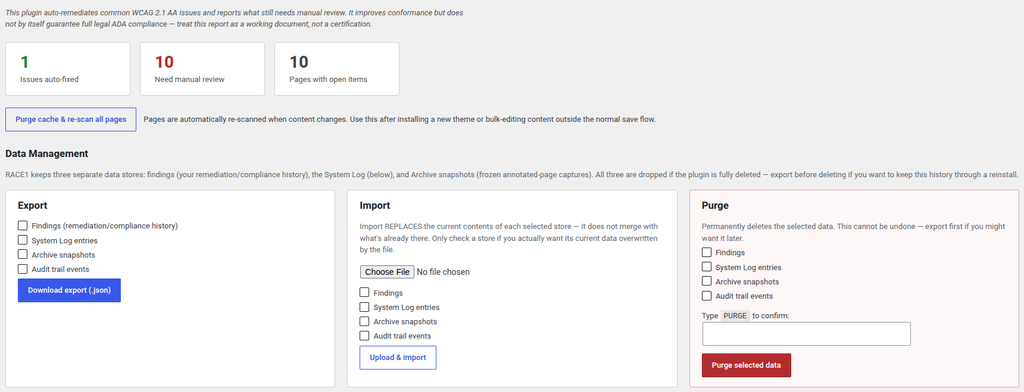
- A dashboard showing what RACE1 has found across your site, what it fixed, and what needs a person.
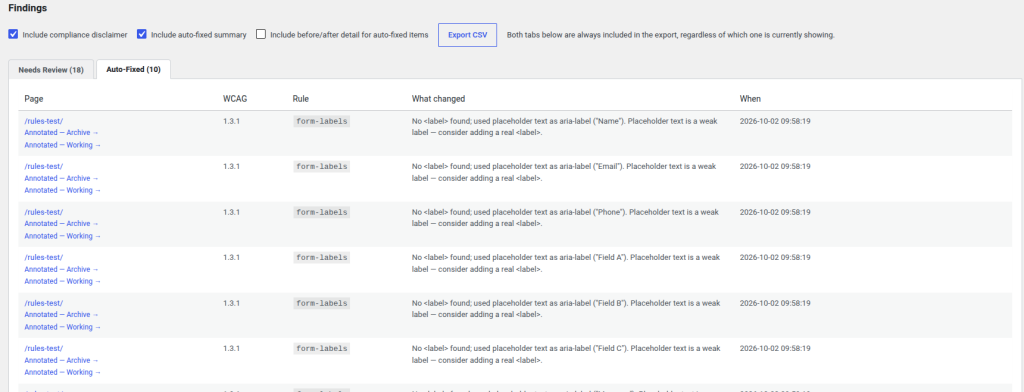
- A findings history. Each issue is tracked from the day it was found to the day it’s resolved, so “when did this appear, and how long was it open?” always has an answer.
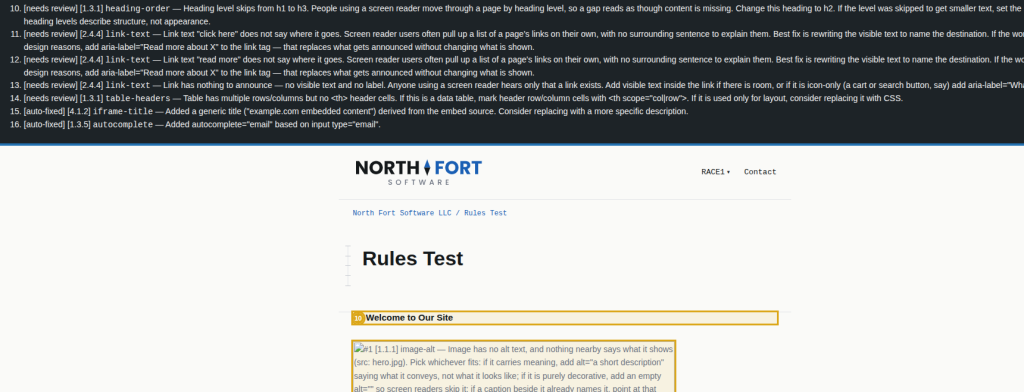
- Two views of every page. The Archive view shows a snapshot from the moment an issue was found. The Working view shows the page as it is now. Both highlight issues in place.
- A tamper-evident audit trail of every discovery, resolution, and reopening.
- A draft Accessibility Conformance Report, as a Word document, to start a conversation with a client or a qualified reviewer.
- CSV export, plus import and deletion for each kind of data.
Every feature is included with every plan. More on what RACE1 does.
Your first month
Each page is sent to RACE1 the first time it’s visited. After that, the plugin remembers the result and only sends the page again when its content changes. So your first month uses more transactions than the months after it: roughly one for each page on your site, plus one each time a page changes.
If your plan’s transactions run out, a notice appears across your WordPress dashboard and pages are served as they were, without fixes, until you add a block or your plan renews.
Good to know
A few things that are easier to know now than to discover on a client’s site.
- Logged-in administrators see pages without fixes. Pages viewed with the WordPress toolbar showing aren’t sent to RACE1. To check the fixed version, use a private browser window or log out.
- The skip link is hidden until it’s needed. RACE1’s “Skip to content” link only appears when a keyboard user presses Tab, so you won’t see it by looking.
- Check your site’s language setting. RACE1 uses it to tell screen readers what language your pages are in. If your site is administered in one language but published in another, set it to the language your visitors read.
- Exclude pages that show visitors’ own details. Checkout, cart, and account pages change for every visitor, so each view uses a transaction, and the plugin keeps a snapshot of every scanned page in your database. Excluding them with one setting avoids both. Excluded pages aren’t fixed.
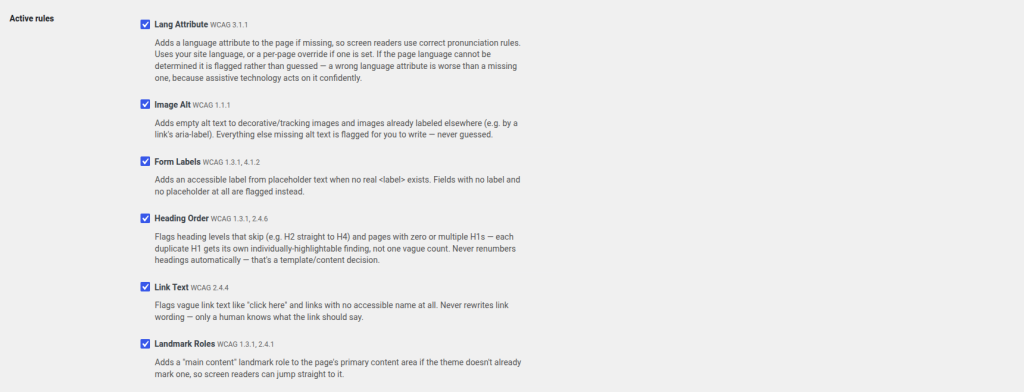
- Turning a rule off hides its findings, not its fixes. The fix is still applied to your pages; it just won’t appear in your reports.
- The possible-abbreviations check is off by default. It will sometimes flag brand names and product codes. If you turn it on, you can add your own terms to its list of known words.
- Scheduled cleanup can run late on a quiet site. It uses WordPress’s built-in scheduler, which only runs when someone visits. If you need it on time, ask your host to set up a real scheduled task (cron) for your site. You can also run cleanup at any time from RACE1’s admin page.
Your data
Your findings, history, audit trail, and page snapshots are stored in your own WordPress database. The RACE1 service processes each page during the request and keeps no copy of your pages or your findings.
You can export, import, and delete each kind of data separately, and set your own automatic cleanup. When you uninstall the plugin, your data stays in your database unless you’ve turned on the option to delete it on uninstall. That option is off by default.
Open source
The plugin is open source, under the same license as WordPress itself. Read it, change it, or use it as the starting point for your own client. Support covers the released version; if you modify the plugin and share it, please give it a different name.
Not on WordPress? See the API and examples.
Getting help
Email support is included with every plan. Contact us with any question, including before you buy.